
2026/01/22 - Node network outage from SDN
I wanted to experiment with proxmox SDN. I started by creating a Simple Zone “test” along with assigning a Vnet and subnet. However when I use the network as the bridge port within VMs and LXCs I would get an error, either the network had no bridge or the network "test" doesn’t exist.
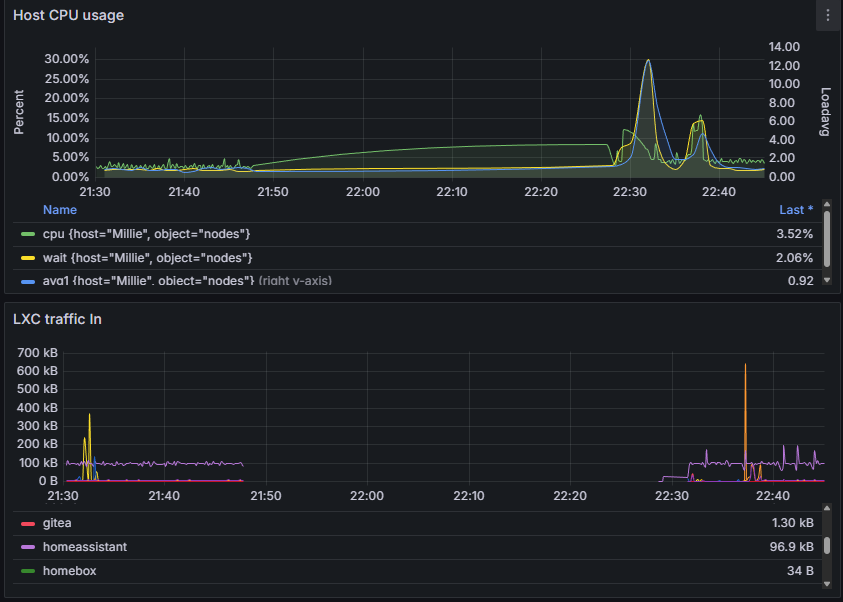
21:47 - SDN Applied
I removed the Simple Zone “test” and created a VLAN Zone “test”. During the setup I had selected vmbr0 as the bridge port and set the vlan to 1. After applying the configuration the web gui would no longer refresh and the error chrome displayed was the address is unreachable.
The primary node had become unreachable from the network. I attempted to access the node via ssh and it resulted in a connection error. It was at this point I also realized I couldn’t ping any of the services hosted on the node. I attempted to access the second node via the web gui by using its IP but I was unable to access the interface as it wouldn’t grant me access. I did some quick research and found other people had this same issue when setting up a Vlan Zones Example.
22:07 - Reboot
Since I couldn’t access the node via the network I had to use the shell via the physical server. Once I plugged in a projector as the monitor and a keyboard I tried to access the server directly. However It was unresponsive with the last lines on the screen mentioning ceph user credentials. Since the server was unresponsive to input I decided to hard reboot the server with via the power button.
Once the server had rebooted I was finally able to log in and as per the advise from the example remove the SDN config and reload the interface using the commands:
rm /etc/network/interfaces.d/sdn
ifreload -a
22:28 - back on line
After 40 minuets of downtime I was finally able to access the web gui again and I removed the SDN config from withing the gui.
I still plan to continue to experiment with SDN but I now know thanks to this experience and the help from the example that I now know what not to do. Or at least if this happens again I know how to fix it.
No comments to display
No comments to display